
Vibe Coding, Explained: What It Is, Where It Works, and Why Vibe-Coded Apps Break
Vibe coding, explained by engineers who take AI prototypes to production: what it means, real examples, why vibe-coded apps break, and when to get help.
Guy Sartori13 min read
You describe an app in plain English. An AI writes it. Twenty minutes later there is something real on your screen that you can click, share, and show investors. That is vibe coding, and in 2026 it is how a huge share of new software ideas get their first version.
This guide explains what vibe coding actually means, what people are really building with it, and the part the tool companies rarely put in their tutorials: where it breaks, what that costs, and how to know when you have crossed the line between a prototype and a product. We build MVPs and take stalled AI-generated prototypes to production at GuyShore, so we see both the wins and the wreckage every week. This is the honest version.
What is vibe coding?
Vibe coding means building software by describing what you want to an AI in plain English and letting the AI write the actual code, instead of writing it yourself line by line. You prompt, the AI generates, you react to what you see, and you prompt again. The loop continues until the thing on the screen does what you had in mind.
The term went from inside joke to industry category in record time. Andrej Karpathy, a co-founder of OpenAI and former head of AI at Tesla, coined it in February 2025, describing a way of building where you "fully give in to the vibes" and stop reading the code the AI produces. By the end of 2025, Collins Dictionary had named "vibe coding" its word of the year, and Wikipedia had an entry for it.
What started as a playful description of how experienced programmers goof around on weekends became something bigger: the main door through which non-technical founders now enter software. You no longer need to know what a database index is to get a working demo of your idea. That part of the promise is real. The fine print is what the rest of this article covers.
In practice, people use "vibe coding" to mean two different things. The original meaning is the pure form: accept whatever the AI writes, never read the code, judge only the result. The looser, everyday meaning is any AI-driven building where prompts do the heavy lifting. The first is fine for throwaway projects. The second is how serious prototypes get made. Every warning in this guide is about letting the first mindset ship something the second mindset built.
Why is it called vibe coding?
The name comes from Karpathy's original joke: instead of carefully reviewing every line the AI writes, you code by vibes, accepting what the AI produces as long as the app looks and feels right. You judge the result like a user would, not like an engineer would.
That is also the built-in warning. "Looks and feels right" is exactly how software can appear finished while hiding problems underneath, which is why the same word that describes the fun of it also describes the risk.
How does vibe coding work? The tools people actually use
Vibe coding happens in three layers of tools: prompt-to-app builders, AI-first editors, and agentic coding terminals. They differ in how much control you have and how much the tool hides from you.
| Layer | Tools people use | Best for | Typical ceiling |
|---|---|---|---|
| Prompt-to-app builders | Lovable, Bolt, Base44, v0, Replit (app mode) | Non-technical founders getting a working demo fast | Auth, payments, and anything the template didn't anticipate |
| AI-first editors | Cursor, Windsurf, Replit (editor), GitHub Copilot | People willing to see code, even without writing it | Debugging across many files, infrastructure |
| Agentic terminals | Claude Code, Gemini CLI, Codex | Technical users directing an AI that executes multi-step work | Still needs someone who can review what it did |
The workflow is similar everywhere. You describe the product ("a booking site for my gym with online payments"), the AI scaffolds the whole thing, and you iterate in plain English: "make the calendar weekly," "add a cancellation policy checkbox." The builder deploys it for you with one click.
If you have never done it, here is what a first vibe coding session actually looks like:
- Start with one sentence, not a spec. "A booking site for a personal trainer, with a weekly calendar and online payments." Let the AI make its first guess; correcting something concrete is faster than describing everything upfront.
- React to the screen, not the code. Say what is wrong the way you would to a designer: "the calendar should start on Monday," "clients should not see each other's names."
- Add one feature at a time. Big multi-part prompts are where AI-generated apps start contradicting themselves. Small steps keep the illusion of control closer to actual control.
- Test like a stranger. Open the app in an incognito window, on your phone, and try to do things wrong: skip fields, click twice, go back mid-payment. This five-minute habit catches half the embarrassing bugs before your users do.
- Stop at the demo. When the app convinces you (or your first testers) that the idea works, resist the urge to keep prompting your way into production. That decision point is the whole second half of this article.
Two honest notes from the field. First, the demo speed is not fake: getting to something clickable genuinely takes minutes, and that changed how ideas get validated. Second, every layer has a ceiling, and the more the tool hides from you, the sooner you hit it. When your prompt says "fix the login bug" for the fifth time and the AI keeps apologizing and breaking something else, you have met the ceiling.
Vibe coding examples: what people are really building
Real vibe-coded projects fall into three buckets: internal tools and dashboards, landing pages and MVPs, and small paid apps. The failure rate rises sharply as you move toward the paid end.
Internal tools and dashboards. This is where vibe coding shines brightest. A sales tracker that replaces a spreadsheet, a dashboard that pulls three APIs into one screen, a form that feeds your CRM. Low stakes if something misbehaves, no strangers' data, no payments. Many businesses quietly save hours every week with tools like these, often connected to automations. (When the tool needs to talk to the rest of your stack reliably, that is closer to our Automations and Integrations work than to vibe coding.)
Landing pages and MVPs. The second-best use. A vibe-coded MVP can genuinely test demand: put the idea in front of users, watch what they click, learn before spending real money. Y Combinator reported in 2025 that a quarter of one entire startup batch had codebases that were almost entirely AI-generated. Validation is exactly what these prototypes are for.
To make those buckets concrete, here is the pattern we see over and over in the prototypes founders bring us. The internal tool that works: an operations manager replaces four spreadsheets with a vibe-coded dashboard, the team loves it, and the only "incident" is a chart that breaks on Mondays. The MVP that does its job: a founder ships a booking demo in a weekend, gets thirty real signups in two weeks, and walks into investor meetings with usage data instead of slides. And the one that goes wrong: the same booking demo starts taking real payments, a duplicated Stripe webhook charges a customer twice, and the founder discovers there is no log anywhere that explains what happened. Same tools, same founder profile, three different endings, decided entirely by which bucket the app was allowed to stay in.
Small paid apps. This is where the stories split. Yes, there are vibe-coded apps making money, and the ecosystem's flagship example is Base44, a prompt-to-app platform largely built by one person that Wix bought for 80 million dollars about six months after launch. But for every highlight there is a graveyard of apps that collapsed the moment real customers arrived: charged cards without delivering, leaked user data, or simply stopped working and nobody could tell why. The difference between the two outcomes is almost never the prompt. It is whether someone who understands production software got involved before real users and real money did.
Is vibe coding good or bad?
Vibe coding is good for validating ideas fast and bad for running a business on top of, and almost every horror story comes from crossing that line without noticing.
Where it shines: speed from idea to demo (minutes, not weeks); cost of testing an idea (close to zero); learning (you see product decisions instantly); interfaces and layouts, which modern AI does genuinely well; and momentum, because showing a working thing beats describing an idea every time.
Where it bites: anything invisible on the screen. Security, data integrity, edge cases, performance under load, the boring glue that makes software dependable. The AI optimizes for "looks like it works." Production software has to keep working when a stranger does something unexpected at 3 a.m.
If you spend time on Reddit threads about vibe coding, you will find both religions: developers calling it a toy, founders calling it a revolution. The boring truth sits in the middle. Is vibe coding a skill? Yes, a real one: describing problems clearly, splitting them into steps, and reviewing results critically is exactly the skill of working with AI, and people demonstrably get better at it. Is vibe coding dead? No. The hype cooled, the tools matured, and it settled into what it actually is: the new standard way to prototype, and a risky way to run production.
Why vibe-coded apps break: the four walls
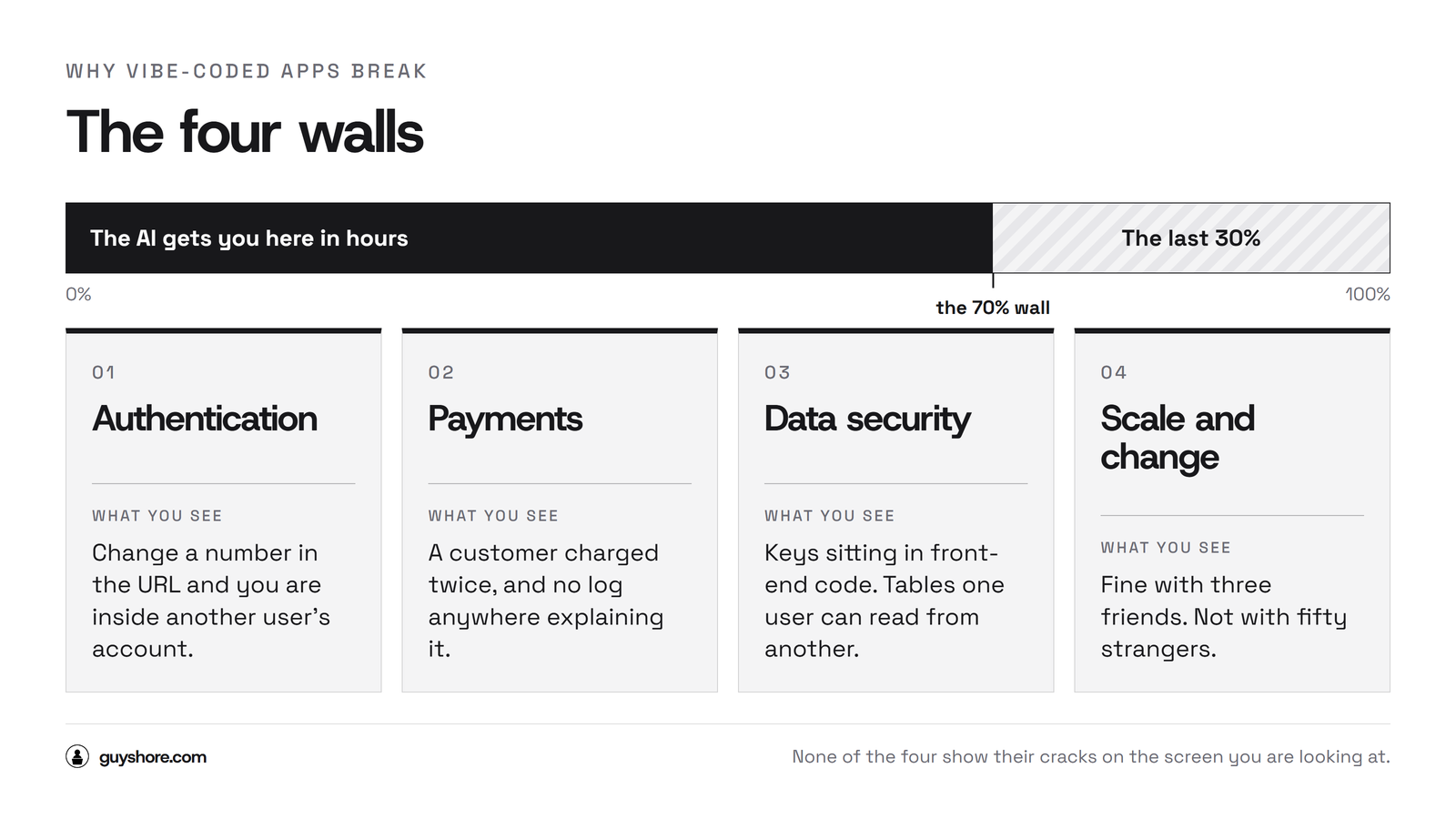
Vibe-coded apps usually break at the same four walls: authentication, payments, data security, and scale. The AI optimizes for "looks like it works" instead of "keeps working," and none of these four show their cracks on the screen you are looking at.
Wall 1: Authentication. Login screens are easy to generate and hard to get right. We have audited prototypes where changing a number in the URL showed you another user's account, and apps where the "admin area" was protected by nothing but the absence of a visible link. The AI built exactly what was asked: a login that works when you use it correctly. Attackers do not use things correctly.
Wall 2: Payments. Charging a card is one API call. Handling the real world of payments (webhooks that arrive twice, refunds, disputes, taxes, a customer whose card fails mid-subscription) is a system. A prototype that "has Stripe" usually has the API call and none of the system, which is how founders end up double-charging customers or giving away subscriptions for free without knowing it.
Wall 3: Data security. In 2025, researchers scanning apps made with popular vibe coding platforms found hundreds exposing users' personal data through missing access rules, invisible from the interface and trivially readable by anyone who knew where to look. The same pattern keeps repeating: API keys pasted into front-end code, databases left open, user tables readable by other users. Nothing on the screen warns the founder, and the incident reports write themselves later.
Wall 4: Scale and change. The demo works with you and three friends. Then 50 real users arrive, or you ask the AI for "one small change," and the whole thing wobbles. AI-generated codebases are often a pile of special cases; the most famous 2025 incident involved an AI coding agent deleting a company's production database during an explicit code freeze. Without structure, tests, and backups, every change is a gamble.
Founders usually discover the four walls through what we call the 70% wall: the AI gets you 70% of the way in hours, and the last 30% (the part behind the walls) costs more time and money than everything before it. That is not a reason to avoid vibe coding. It is a reason to plan for the wall before your users find it for you.
Is vibe coding safe? Security risks in plain English
Out of the box, no. Audits of AI-generated apps keep finding the same holes: exposed API keys, missing access control, and unvalidated input, and none of them are visible on the screen the founder is looking at. Security vendors publish long technical breakdowns of this; here is the version you actually need as a founder.
The five risks worth knowing, in plain English:
- Your secret keys are public. AI code often pastes
API keyswhere the browser can see them. Anyone can copy them and spend your money or read your data. - Your data has no bouncer.
Missing access controlmeans the app never checks who is asking. User A can read user B's records by asking politely. - Your forms believe anything.
Unvalidated inputmeans a maliciousnamefield can be a command. This is how databases get dumped or deleted. - Your app trusts its own front end. Prices, permissions, and limits enforced only in the interface can be changed by anyone who opens the browser's developer tools.
- Nobody is watching. No logs, no alerts, no backups. If something goes wrong tonight, you find out from an angry customer, and you cannot reconstruct what happened.
Before you accept real users, check these eight things (or have someone check them for you):
- No secret keys anywhere in
front-end code - Every data request checks who is asking (
access controlon, by default) - Payments handle the ugly paths: duplicate
webhooks, refunds, failed cards - Forms validate and sanitize everything on the server, not just in the browser
- Automatic backups exist and you have actually restored one
- Basic logging and an alert when something errors
- Dependencies updated and the AI's leftover test routes removed
- One deliberate attempt to break in: change URLs and IDs by hand and see what leaks
If you cannot verify these yourself, that is not a personal failure; it is the exact boundary between prototyping and engineering. An hour with an engineer who audits AI-built apps is the cheapest insurance you will ever buy for your product.
Vibe coding vs traditional coding: when to hire developers
The honest comparison is not vibe coding versus traditional coding. It is speed-to-demo versus cost-to-maintain, and the right answer flips the moment real users and real money enter the app.
| Vibe coding | Professional development | |
|---|---|---|
| First working version | Hours | Weeks |
| Upfront cost | Almost zero | Real budget |
| Cost per change later | Grows fast, unpredictable | Stays roughly stable |
| Security and reliability | Unknown by default | Engineered and tested |
| Complexity ceiling | Low to medium | As high as the business needs |
| Who owns the outcome | You and the tool's limits | A team accountable to you |
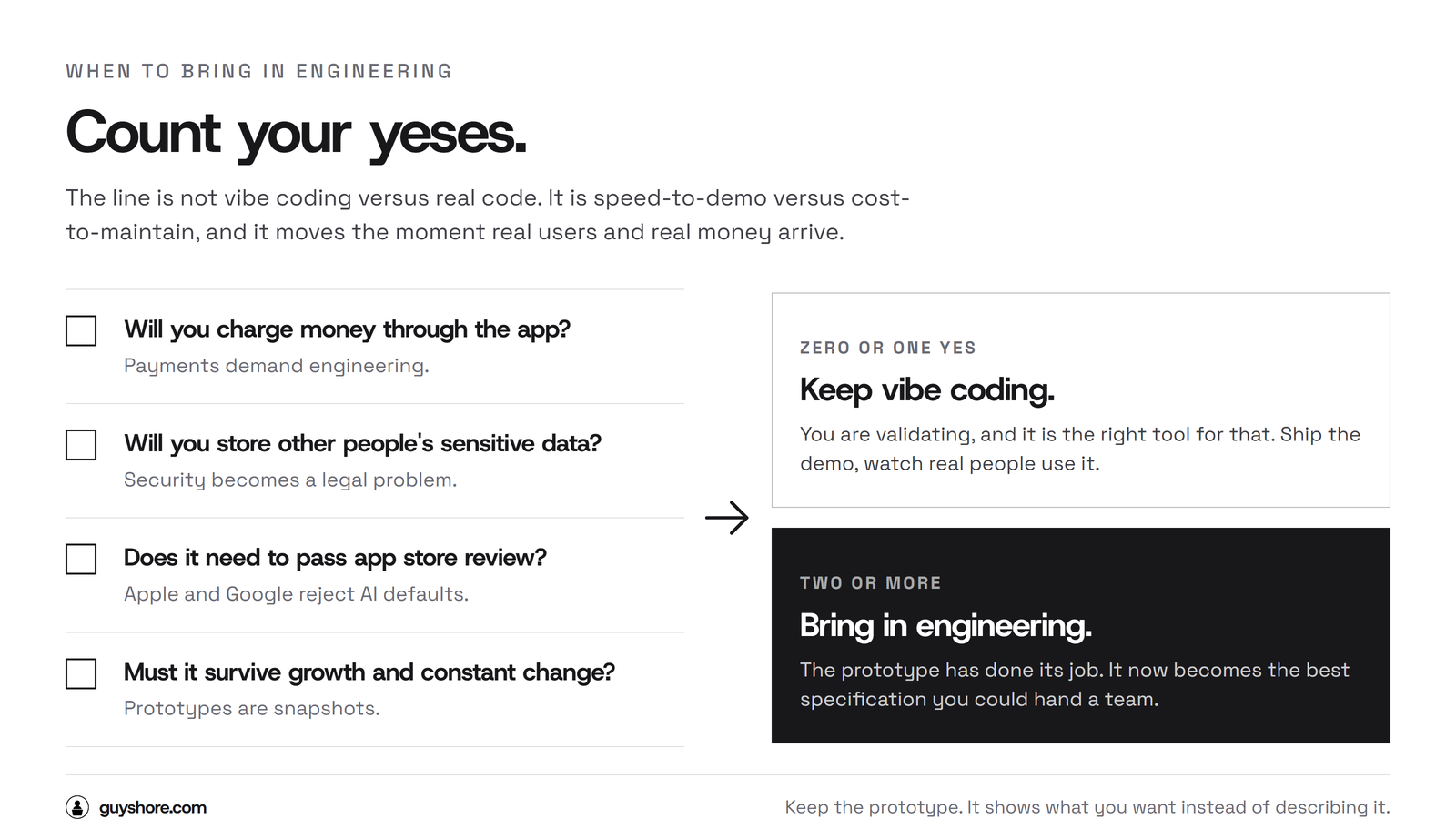
Four questions decide which side of the line you are on:
- Will you charge money through the app? Payments demand engineering.
- Will you store other people's sensitive data? Then security is a legal problem, not a preference.
- Does it need to pass app store review? Apple and Google reject what AI ships by default more often than founders expect. (That review gauntlet is a big part of our App Development work.)
- Do you need it to survive growth and constant change? Production software is a living thing; prototypes are snapshots.
Zero or one "yes": keep vibe coding, you are validating, and it is the right tool. Two or more: the prototype has done its job, and it is time to bring in engineering. That does not mean throwing your prototype away. It usually becomes the specification, the best one you could possibly hand a development team, because it shows exactly what you want instead of describing it. That is how our MVP Development engagements work: fixed scope, a clear timeline (MVPs start at 6 weeks), and the source code is yours from day one.
Not sure which side of the line you are on? Count the yeses honestly, and when it is close, assume the app is further along than it feels. Treating a product like a prototype costs far more than the reverse.
Vibe coding FAQ
Is vibe coding free?
Mostly, to start. Lovable, Bolt, Replit and similar tools have free tiers that are enough to build and share a demo. Costs appear when you add real users: hosting, databases, AI usage, and paid tiers tend to arrive together, usually in the tens to low hundreds of dollars per month.
Can you vibe code an iOS app?
Yes, tools can produce one, but App Store review is where vibe-coded apps most often die: rejections for broken authentication, privacy issues, and instability are common, and fixing them requires engineering. Plan for professional help between "works on my phone" and "approved on the store."
Can you vibe code with ChatGPT or Claude?
Yes. Chatting with ChatGPT or Claude and pasting code works, but purpose-built tools (Lovable, Cursor, Claude Code) manage the files, previews and deployment for you, which is most of the convenience. The chat-only route teaches you more; the tools ship faster.
Is vibe coding the future of programming?
It is already the present of prototyping. Production software in 2026 still gets engineered, increasingly by developers who use AI heavily but review what it writes. The future looks like that pairing, not like unreviewed vibes in production.
Is vibe coding dead?
No. The 2025 hype cooled and the backlash was loud, but usage kept growing; it simply settled into its real role as the fastest way to turn an idea into something testable.
What should I do if my vibe-coded app is stuck or broken?
Don't start over. Have an engineer audit what the AI produced, keep what works, and map the shortest path to production. Rebuilding from zero throws away the one thing the prototype already earned you, which is knowing what the product actually has to do.
The bottom line
Vibe coding is the best thing that ever happened to people with software ideas and no software background. It is also the fastest machine ever built for shipping unaudited code to strangers. Both are true, and the founders who win are the ones who use the first fact and respect the second: vibe-code the idea, validate it with real users, and bring in engineering before the walls do it for you.
If you are somewhere in that journey with a prototype on your hands, start with the eight checks above. Be honest about the ones you cannot verify yourself, because that list is the difference between launching and finding out from an angry customer.
Guy Sartori is the founder of GuyShore. Developer since 2012, he leads a team that builds MVPs, apps and production software for non-technical founders in the US, including taking stalled AI-generated prototypes to production.